Steam and CSFloat both show you a skin’s float. What neither tells you is what that float is worth, and it can be worth a lot: the cleanest AK-47 | Redline sells for nearly ten times a worn one. CSlytics gives you the price at your exact float. Look any skin up for free on the Float Curves page, or let CSlytics Desktop price everything you own at its float and list it on Steam or CSFloat, as many items as you like at once.
Free, in your browser
Float Curves
Search your skin, pick Steam or CSFloat, and hover the curve at your float. The tooltip gives the fair price there. No sign-in, no download.
Open Float CurvesFor the skins you own
CSlytics Desktop
Every copy shows its float. One press prices each one at its own float, and you list them all on Steam or CSFloat together.
Download for WindowsHow we work out what a float is worth
Every day, CSlytics collects the live listings for every skin on Steam and on CSFloat, thousands across the market, each with its float and its price. From those we work out the going price at every float, for each wear of each skin: what copies at that float are actually listed for. That is the fair line on the curve. Each market’s own listings, lowest asks and buy orders are drawn beside it, so you can see where yours would sit. The AK-47 | Redline’s curves show 747 listings across the two markets, and every one is a dot you can hover.
Quick answers
- How much is my float worth?
- Open your skin on the Float Curves page, pick Steam or CSFloat, and hover the curve at your float. The tooltip gives the fair price at that float. Here is the AK-47 | Redline on Steam.
- Is a low float really worth that much more?
- Often, yes. On the AK-47 | Redline's float curve, read on October 29, 2026, a copy at 0.10, the cleanest the skin comes, was fair at $236.55, and one at 0.30 at $24.78. Even inside Field-Tested, 0.15 was worth $66.15 against $24.78 at 0.30. Same skin, very different money.
- Where can I see a skin's float?
- On the Steam Market, every listing on a skin's page carries its float and pattern, and the filters can narrow it to a float range. CSFloat shows the float on every listing too. For skins you own, CSlytics shows the float on every inventory row, across all your accounts and storage units.
- How do I sell at that price?
- In CSlytics Desktop, select your items, press Stage listing, then Float price. Each item is priced at its own float. Choose Steam or CSFloat and press List all. The steps below show it, and the Steam and CSFloat bulk listing guides go further.
- Does it cost anything?
- No. The Float Curves page is free and needs no sign-in. CSlytics Desktop is free and open source, for Windows 10 and 11.
Pricing and listing your skins by float, step by step
Find the skin in your inventory
Every copy has its own row with its float on a wear bar and its pattern, across every account you add and every storage unit. To find one float among many, typef < 0.2into the search bar, as the search guide shows.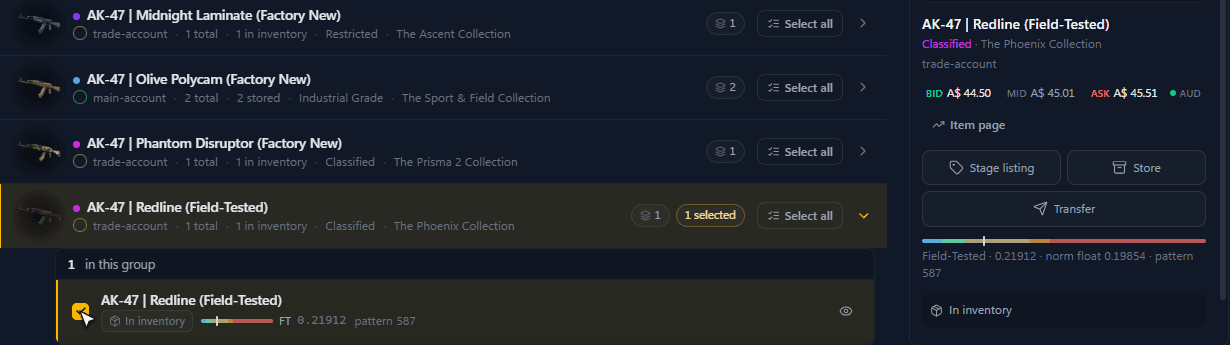
One Field-Tested Redline at 0.21912, pattern 587. Selecting it opens the panel on the right. Select your copies and press Stage listing
Pick one copy or many. For one, the panel beside the list shows its float, its norm float and its pattern, with the bid and ask on Steam. Stage listing puts the selection in the listing workspace, where rows are priced. Nothing is listed yet.See where your copy sits on the float curve
The rising-line button on a row, Item page, opens that skin’s page. Its float curve marks every copy you staged with a dashed line at its float and a diamond at its price. The dots around it are the market’s listings; hover one for its float and price.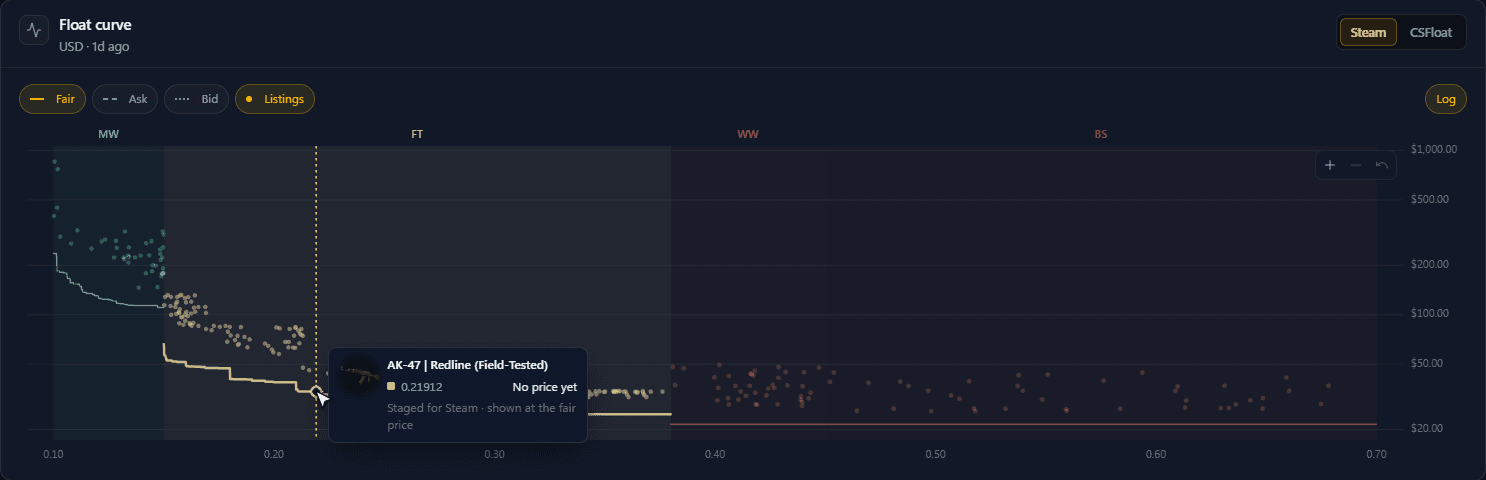
The staged copy at 0.21912 on the Steam curve, not priced yet. The dots to its left are cleaner copies, listed higher. Press Float price
Open the workspace from its pill at the top right of the window, open Price all rows and press Float price. Every row takes the price on its marketplace’s curve at its own float, in the row’s currency. Change any price by hand if you want to.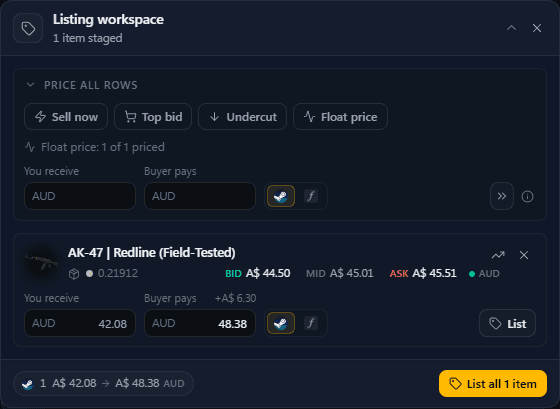
Float price filled the row: the buyer pays A$48.38 and you receive A$42.08 after Steam's fee. Check it, then list on Steam or CSFloat
Hover the diamond to see the price against the curve. Then choose Steam or CSFloat for each row, or one marketplace for every row under Price all rows, and press List all. Steam listings still need your confirmation on your phone. CSFloat listings use your own CSFloat API key, which the CSFloat guide shows you how to set up.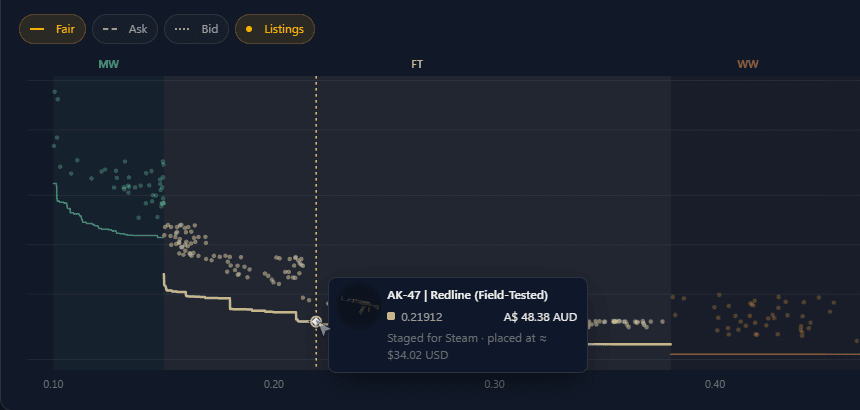
A$48.38 on Steam, placed on the US dollar curve at about $34.02.
Price any skin on the web
The Float Curves page draws the same curves for any skin, without the app. Hover a dot for that listing’s float and price, or hold Shift and drag a box over a stretch of floats to get the lowest, median and highest price of the listings inside it, and how far they sit from the fair line. You can lay up to six skins over each other, and switch to a normalized axis to compare skins with different float ranges.
Float and wear, in brief
A float is a number from 0 to 1, and lower is cleaner. The wear name is just the band the float falls in, and each band starts at its lower edge, so 0.15 exactly is Field-Tested.
| Wear | Float |
|---|---|
| Factory New | 0.00 to under 0.07 |
| Minimal Wear | 0.07 to under 0.15 |
| Field-Tested | 0.15 to under 0.38 |
| Well-Worn | 0.38 to under 0.45 |
| Battle-Scarred | 0.45 to 1.00 |
A skin can only reach part of this range. The AK-47 | Redline runs from 0.10 to 0.70, so there is no Factory New Redline.
CSlytics also shows a norm float: where the float sits in that skin’s own range, from 0 for the best it can be to 1 for the worst. The Redline’s 0.21912 is 0.19854 of the way along its 0.10 to 0.70 range.
Good to know
- The fair price is what copies at that float are listed for, before fees. It is not an offer for yours. Turn on Bid on the curve to see the highest buy order at each float.
- The curves are in US dollars. A price in another currency is placed on the curve at the day’s exchange rate and marked with ≈.
- Stage listing and Float price change nothing on Steam or CSFloat. A listing is only made when you press List.
More questions
- What is a good float value?
- Lower is cleaner, and the lowest floats of each wear usually sell for the most. What counts as good depends on the skin, because each skin can only reach part of the 0 to 1 range. Norm float puts every skin on the same scale: 0 is the best float that skin can have.
- Is the float the same as the pattern?
- No. The float sets how worn the paint looks. The pattern, or paint seed, is a separate number that sets where the paint sits on the weapon. CSlytics shows both on every inventory row.
- Is the price the same on Steam and CSFloat?
- The fair line is: one price per float, worked out from both markets' listings. What differs is each market's own listings, lowest asks and buy orders, and their fees. Switch between Steam and CSFloat on the curve and turn on Ask and Bid to see where your skin would sell.
Related guides
- How to see what a CS2 skin is worth at its exact float
- How to sell multiple items at once on the Steam Market (CS2)
- How to manage CS2 storage units in bulk
- How to move CS2 items between your own Steam accounts
- How to list CS2 items on CSFloat in bulk
- How to manage multiple Steam accounts for CS2 trading
- How to search your CS2 inventory by float, wear, pattern and storage unit