Steam signs in one account at a time, so trading across alts means logging in and out all day. CSlytics keeps every account signed in at once, in one window. Their inventories, storage units, wallets and listings sit side by side, and you can search, list, store and move items across all of them together.
Why it is hard with Steam alone
The Steam client and the Steam website each hold one signed-in account. Switching means signing out, signing in and entering a Steam Guard code. Browser profiles help, but every account is still its own window, and none of them can see storage units.
How CSlytics signs in
| Question | Answer |
|---|---|
| How do I add an account? | Scan a QR code with the Steam mobile app, or type the username and password and then the Steam Guard code. |
| Do I sign in every time? | No. The sign-in is saved, encrypted by Windows, and every account reconnects when CSlytics opens. |
| Does it ask for Steam Guard secrets? | Never. Confirmations stay on your phone. |
| Where is my data kept? | On your computer. Removing an account deletes its data and its saved sign-in. |
Working across accounts
Add each account once
Press Add account and sign in. Repeat for every account you trade on.Switch with the account strip
Every account is a tab at the top, with its wallet balance and when it last synced. All accounts shows them together. One click shows a single account.
All accounts, then one tab per account. Account names here are replaced with placeholders. See every account on one page
Portfolio has a By account table: what each account holds, its Steam wallet, its CSFloat balance, what it has listed and how many items it has stored. Below it, a card per account says whether it is fully connected.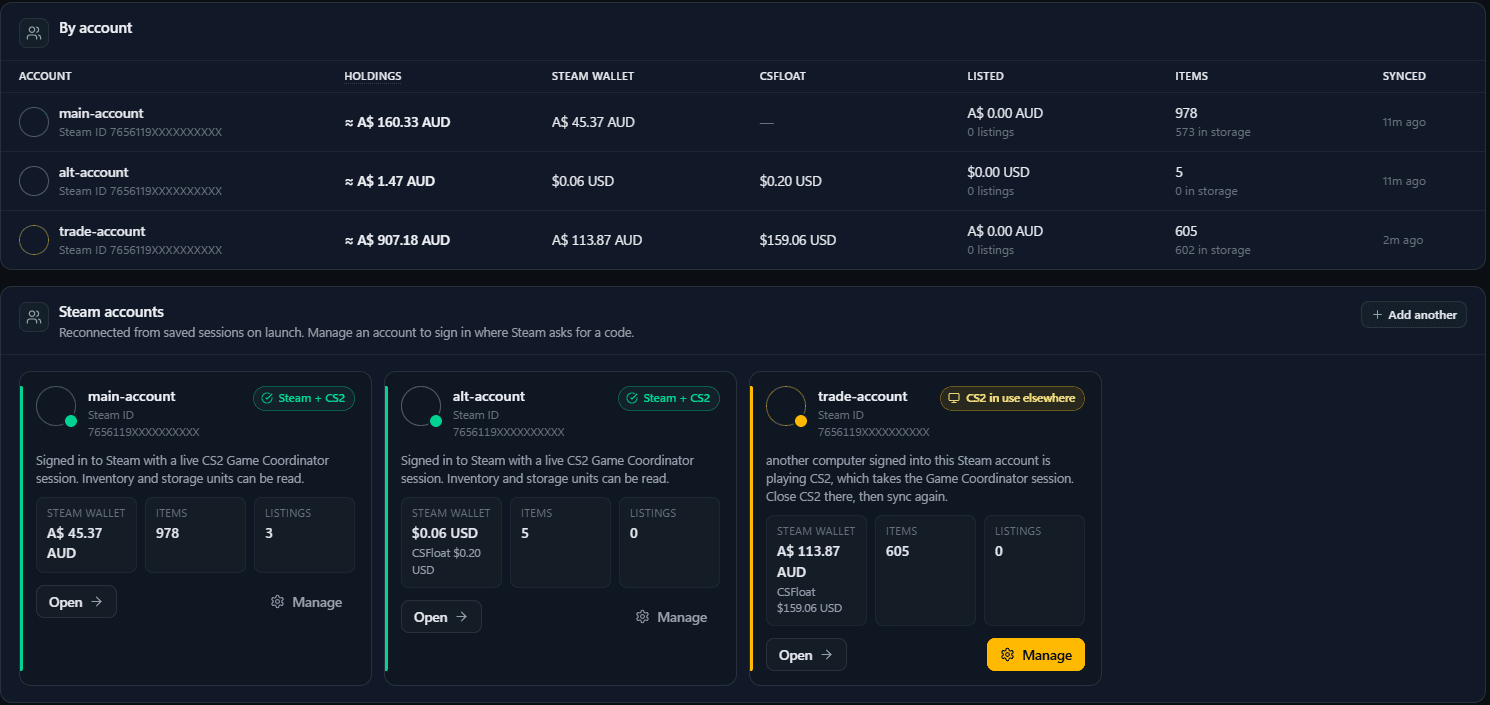
Three accounts in one table. The third card shows CS2 running on that account elsewhere. Act on items from any account
On the All accounts tab, the search bar covers every account. Select items from several accounts and list them, store them or move them to another account in one go. Each account does its own part.Manage one account's settings
Settings has a page per account with its Steam and CSFloat connection, and the options to reset its data or remove it.
One account's page: Steam connected with CS2, and CSFloat connected.
When an account is playing CS2
Steam gives the CS2 game servers to one computer per account. If you are playing CS2 on an account, CSlytics can still read its Steam wallet and listings, but not its inventory or storage units. The card says CS2 in use elsewhere. Close CS2 on that account and sync again.
Good to know
- Each account confirms its own listings and trades on its own phone app.
- Each account keeps its own wallet currency. Portfolio can convert everything to one currency for totals.
- Accounts connect one after another when CSlytics opens, so the last ones take a few seconds longer.
Questions
- Will Steam flag me for using several accounts?
- Owning several Steam accounts is allowed. CSlytics signs in the same way the Steam client does, one account at a time.
- Can I sign out of one account without removing it?
- Yes. Sign out keeps the account and its data, and Connect brings it back without a code.
- Can I use the same accounts on another computer?
- Yes, but CS2 inventory access is one computer at a time per account, the same as the game.
Related guides
- How to check the float value of a CS2 (CS:GO) skin on the market
- How to see what a CS2 skin is worth at its exact float
- How to sell multiple items at once on the Steam Market (CS2)
- How to manage CS2 storage units in bulk
- How to move CS2 items between your own Steam accounts
- How to list CS2 items on CSFloat in bulk
- How to search your CS2 inventory by float, wear, pattern and storage unit