Steam’s inventory page can only search by name, and it never shows what is inside your storage units. The CSlytics search bar searches every item on every account you add, including stored ones, by name, wear, float, pattern, StatTrak, location and lock. Type awp fn st to find StatTrak Factory New AWPs, or f < 0.07 for everything under 0.07 float, then select all the matches and list, store or move them.
What Steam’s own inventory search does
The search box on your Steam inventory matches item names, and the filters beside it cover type and rarity. It cannot filter by float or pattern, it sees one account at a time, and it skips storage units completely. Finding your lowest float copy of a skin means opening each one.
How the CSlytics search bar works
You type, and the bar suggests filters. Picking a suggestion turns it into a chip. The chips are the search, and an item has to match all of them. So awp fn st becomes three chips: AWP, Factory New and StatTrak.
Text that no suggestion claimed becomes a plain name search when you press Enter.
What you can type
| To find | Type |
|---|---|
| An item, collection, category or rarity | galil |
| A wear | fn mw ft ww bs |
| StatTrak, Souvenir or normal | st souv normal |
| Below or above a float | f < 0.07 float > 0.15 |
| A float band | 0.15-0.38 |
| A float close to a value | float = 0.15 |
| The best part of a skin's own range | nf < 0.01 |
| A pattern | #661 seed 661 |
| Where it is | inv storage listed |
| One storage unit | the unit's name |
| What is locked | tradable locked market locked |
| One account | the account's name |
float = 0.15 matches within 0.0005 either side. nf is the float within that skin's own range, so nf < 0.01 is its best 1%.
Using it, step by step
Start typing a name
Item names you already hold come first, with how many you own beside them. The general name sits on top, soscaroffers every SCAR-20 before the individual skins.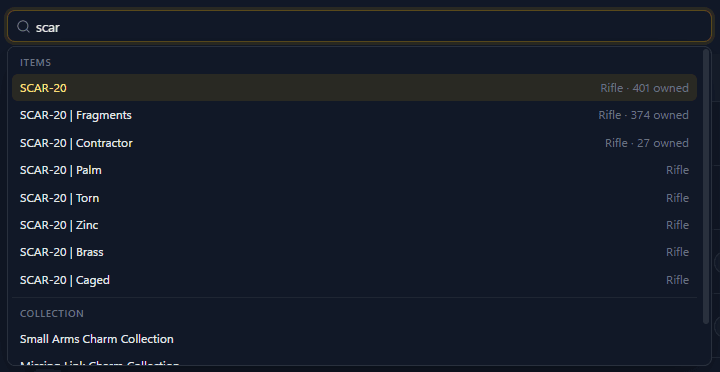
Typing scar. The three names this account holds are listed first, with their counts. Start a filter before you know the number
You do not need to finish a filter for the bar to offer it. A singlefoffers Float below, Float above and Float about. Pick one and it writesfloat <into the box and waits for the number.nfandpatwork the same way.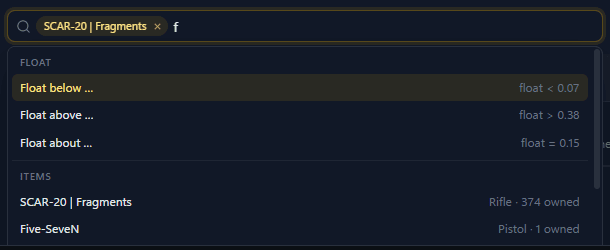
One letter typed. The float filters are offered before any item names. Stack chips until the list is what you want
Each chip narrows the list further. Here a skin name, a float limit andstorageleave 63 copies, every one of them inside a storage unit.
Three chips: the skin, Float below 0.1 and In storage. 63 records match. Select all and act
Press Select all to take every match, even thousands of them. The side panel then offers what the selection allows: List for sale, Store, Retrieve or Transfer.
Keyboard shortcuts
| Key | Does |
|---|---|
/ | Jump to the search box from anywhere on the page. Ctrl+F does the same. |
| Up and Down | Move through the suggestions. |
| Enter or Tab | Take the highlighted suggestion. |
| Enter with the list closed | Search names for exactly what you typed. |
| Esc | Close the list. Press it again to clear the box. |
| Backspace in an empty box | Remove the last chip. |
| Left at the start of the box | Step onto the chips, then Backspace removes one. |
It works on Listings and Buy orders too
- Listings has the same bar, without the location and lock filters, since everything there is already listed. Type a listing number to find one listing.
- Buy orders has it too, without location, lock and the float within a skin’s range, because an order is for something you do not own yet.
Questions
- Does it search items inside storage units?
- Yes. Stored items are part of the inventory in CSlytics. Add storage, or the unit's name, to search only inside units.
- Can I search across all my Steam accounts at once?
- Yes. On the All accounts tab the search covers every account you have added. Add an account's name as a chip to narrow it to one.
- How do I find my lowest float copy of a skin?
- Pick the skin's name, then add f < 0.01, or nf < 0.01 for the best 1% of its range, to see only the best copies.
- Does searching send anything to Steam?
- No. The search reads the copy of your inventory that CSlytics keeps on your machine.
Related guides
- How to check the float value of a CS2 (CS:GO) skin on the market
- How to see what a CS2 skin is worth at its exact float
- How to sell multiple items at once on the Steam Market (CS2)
- How to manage CS2 storage units in bulk
- How to move CS2 items between your own Steam accounts
- How to list CS2 items on CSFloat in bulk
- How to manage multiple Steam accounts for CS2 trading