In CS2 you load a storage unit inside the game, moving items in one at a time. CSlytics does it in bulk from Windows: select any number of items, pick a unit and press Store. It retrieves the same way, and it can list a stored item for sale directly by taking it out first. Each unit still holds at most 1,000 items.
What the game lets you do
Storage units are bought from the in-game store. To use one you open CS2, open the unit, and load items into it from your inventory. Taking items out works the same way. Nothing inside a unit shows on your Steam inventory page or on trading sites, so selling a stored item means opening the game, taking it out, then listing it.
The 1,000-item limits on units and your inventory
| Limit | What it means |
|---|---|
| 1,000 items per unit | A full unit refuses anything more. Pick another unit. |
| 1,000 items in your inventory | Stored items do not count, but retrieving does. You need a free slot for every item you take out. |
| Traded items wait | An item you received in a trade cannot go into a unit for about seven days. Items bought on the Steam Market can be stored straight away. |
| One CS2 session per account | If CS2 is running on the same account on any computer, that session holds the account and storage moves wait until it closes. |
Unit and inventory limits are the game's own. The lock rules were observed on live accounts.
Storing and retrieving in bulk with CSlytics
In our test, 900 items went into one storage unit with a single press, and every move was confirmed in 2 minutes 2 seconds.
Select what you want to store
On the Inventory page, narrow the list with the search bar, for example a name plusinvfor items in your inventory. Tick the copies you want or press Select all.Press Store and pick a unit
The side panel lists your units with how full each one is. Pick one and press Store. CSlytics refuses up front if the unit cannot fit the selection.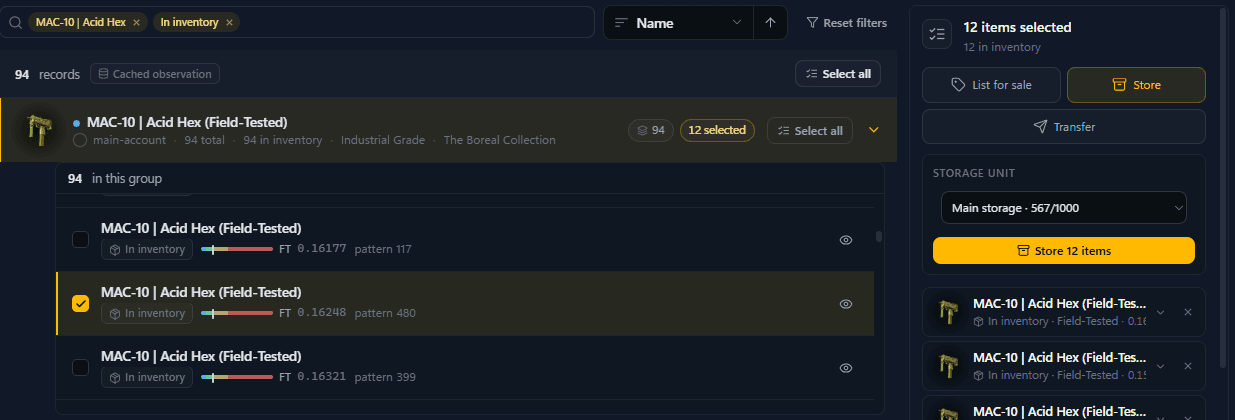
Twelve copies selected. The unit picker shows 567 of 1,000 slots used. Watch it move
Each item is sent to the game and checked off once the unit’s contents show it. On our test account twelve items were stored and confirmed in about five seconds. Our 900-item batch took 2 minutes 2 seconds.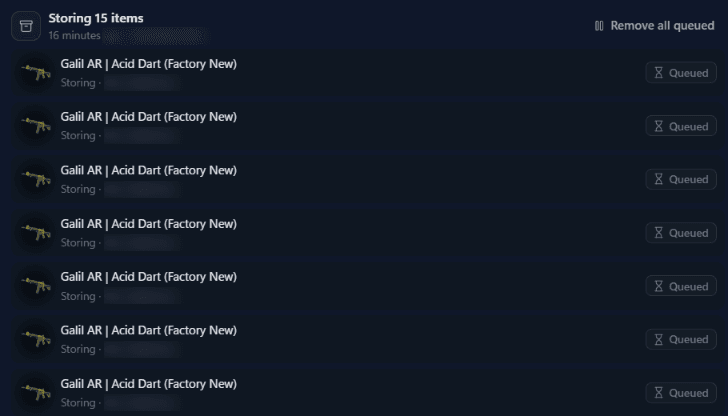
A batch in progress in the activity log. Account names are blurred. Retrieve the same way
Type the unit’s name in the search bar to see only what is inside it. Select the items and press Retrieve. The panel tells you how many free inventory slots it needs.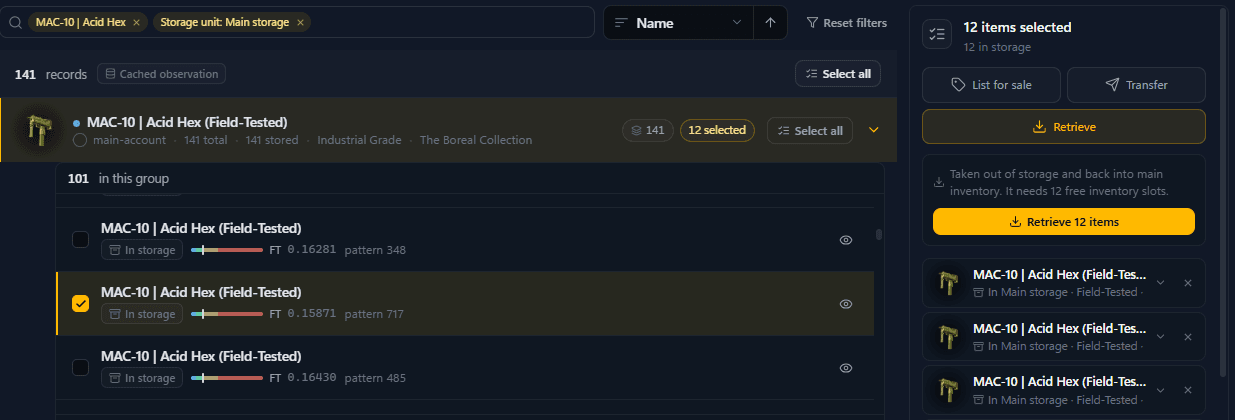
Twelve stored copies selected by unit. Retrieving them needs 12 free inventory slots.
Selling items that are in storage
You do not need to retrieve before you sell. Select stored items and press List for sale. CSlytics takes each one out of its unit, then lists it. The Steam Market guide walks through the listing part.
Known limits
- Very large storing operations sometimes stop part way. The work panel shows how many items moved and why the rest did not. Select what is left and press Store again.
- A brand new storage unit has to be named once in CS2 before it can be used. An unnamed unit does not accept items from outside the game.
Questions
- Do I need CS2 open?
- No. CSlytics talks to the game's servers itself. CS2 must not be running on the same account at the same time, on this computer or any other.
- Why can't I take items out of a storage unit?
- Your inventory holds at most 1,000 items. Stored items do not count toward that, but each item you take out needs a free slot, so make room first or take out fewer at once.
- Can I see what is inside a unit without the game?
- Yes. Stored items appear in Inventory with the unit's name, and the search bar can filter to one unit.
- Can I store items from several accounts at once?
- Yes, on the All accounts tab. Each account stores into its own units.
- Is it safe to store a thousand items at once?
- The game takes about nine moves a second per account, so CSlytics sends eight. Close to a thousand stores have landed on their first try in testing, but see the known limits above.
Related guides
- How to check the float value of a CS2 (CS:GO) skin on the market
- How to see what a CS2 skin is worth at its exact float
- How to sell multiple items at once on the Steam Market (CS2)
- How to move CS2 items between your own Steam accounts
- How to list CS2 items on CSFloat in bulk
- How to manage multiple Steam accounts for CS2 trading
- How to search your CS2 inventory by float, wear, pattern and storage unit