CSlytics lists on CSFloat with your own CSFloat API key, from the same listing screen it uses for the Steam Market. Select items on any account, choose CSFloat as the marketplace, type one price and list them all. When something sells, CSlytics sends the Steam trade offer to the buyer and you confirm it on your phone.
How selling on CSFloat works
CSFloat is a marketplace that pays in real US dollars rather than Steam wallet funds. You list an item from your Steam inventory, and it stays in your inventory while listed. When a buyer pays, you have to send them the item with a Steam trade offer, and the sale settles once Steam’s reversal period has passed.
Fees and deadlines
| Rule | What it means |
|---|---|
| 2% sale fee | Taken from the sale price. Withdrawing to your bank costs 2.5%. |
| Prices in US dollars | You can type another currency in CSlytics, but CSFloat always receives and pays in USD. |
| About two hours to deliver | After a sale you must send the trade offer and confirm it on your phone within about two hours. Missing it hurts your CSFloat standing. |
| About eight days to settle | The buyer accepts on Steam, then the trade sits in Steam's reversal period before CSFloat counts it as verified. |
| No far-above-market prices without KYC | CSFloat refuses a listing it suspects is overpriced unless the account has completed KYC and Stripe onboarding. Pricing a little above the highest buy order for that float avoids it. The work panel shows CSFloat's reason when it refuses. |
| Tradable items only | An item still under a trade or market lock cannot be listed until the lock ends. |
Setting it up and listing
Create a developer API key on CSFloat
Sign in to csfloat.com and create a developer API key from your profile. The key lets CSlytics read your listings, sales and balance, and create and cancel listings for you.Paste the key into the account's CSFloat page
Open Settings, pick the Steam account, then CSFloat. Paste the key and press Connect. Windows stores it, and it is never shown again. Press Refresh eligibility so CSlytics knows which items CSFloat will accept.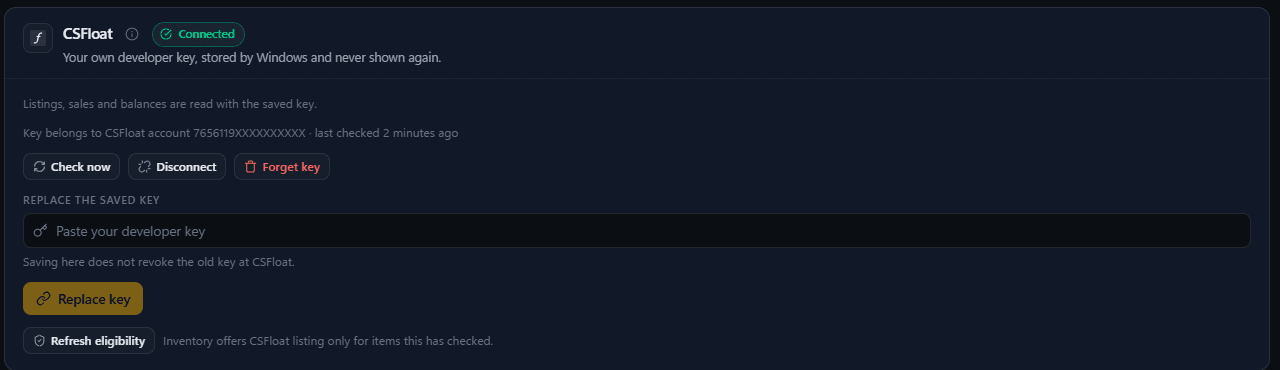
A connected key. Check now, Disconnect and Forget key sit beside it. The CSFloat account number is masked. Check the account's standing
The same page shows what CSFloat reports: your standing, balance, fees, whether your stall is public or away, and which readiness checks are done.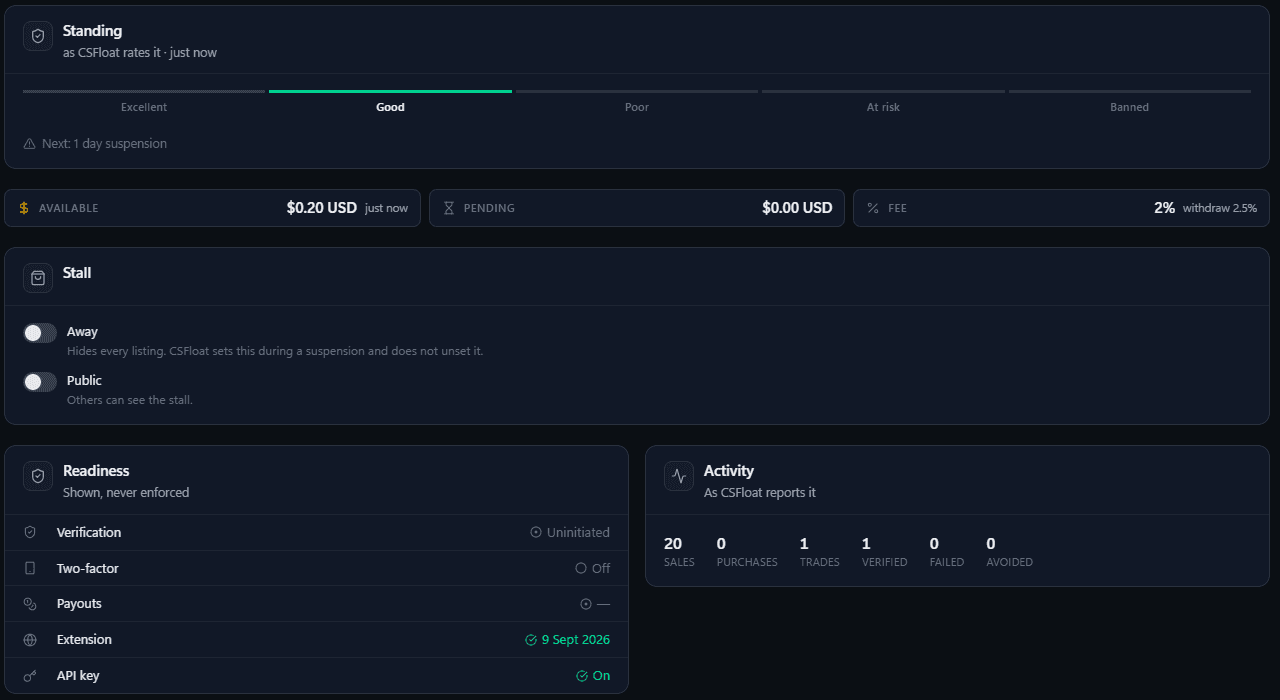
Standing, balance, fees and stall settings for one connected account. Select items and press List for sale
This is the same listing workspace shown in the Steam Market guide. Under For every row, set the marketplace to CSFloat and type what the buyer pays. What you receive is worked out from the 2% fee. Press Apply to all rows, then List all. Each row can still have its own price or marketplace.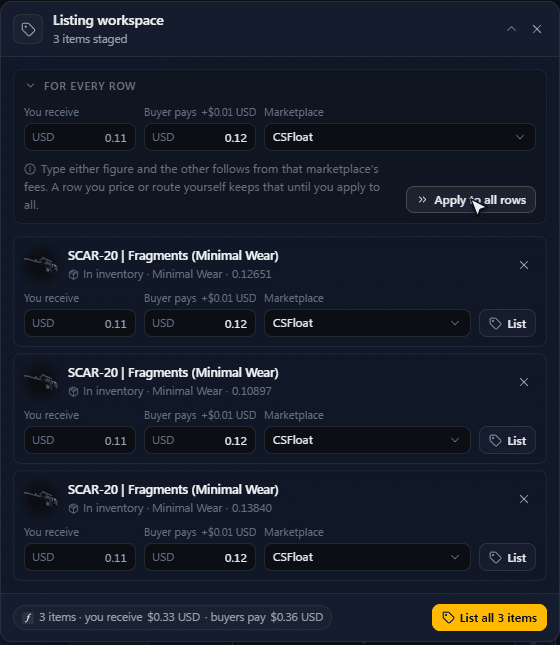
Three items set to CSFloat at US$0.12 each, just above the highest buy order of US$0.07. After the fee the seller receives US$0.11 each. Reprice, cancel and deliver from the app
Open Listings and pick CSFloat to see what is listed there. The pencil changes a price in place and the bin takes a listing down. When an item sells, CSlytics sends the trade offer to the buyer. Confirm it on your phone and it does the rest.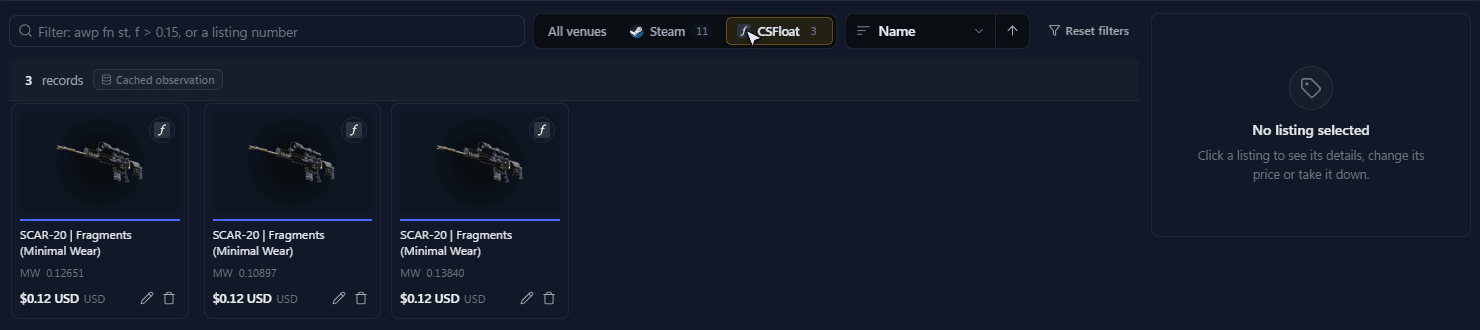
The three listings live on CSFloat a few seconds after List all.
Steam and CSFloat at the same time
A setting called Protect against double listing is on by default. It stops CSlytics from listing the same item on Steam and CSFloat at once, so one sale never leaves you owing an item you no longer have. Turn it off in Settings if you want both.
What CSlytics will not do
- It will not confirm the delivery trade for you. That stays on your phone.
- It does not run auctions or accept offers from buyers. Listings are fixed price.
- It never shares your CSFloat key. The key goes from your computer to CSFloat only.
Questions
- Can I list from several accounts on CSFloat?
- Yes. Each Steam account connects its own CSFloat key, and the listing workspace sends each item to its own account's CSFloat.
- Can I list items that are in a storage unit?
- Select them like any other item. An item has to be in your inventory for CSFloat to see it, so take it out first if CSlytics does not offer CSFloat for it.
- What does Forget key do?
- It deletes the saved key from this computer. It does not revoke the key at CSFloat, so revoke it there too if you are done with it.
Related guides
- How to check the float value of a CS2 (CS:GO) skin on the market
- How to see what a CS2 skin is worth at its exact float
- How to sell multiple items at once on the Steam Market (CS2)
- How to manage CS2 storage units in bulk
- How to move CS2 items between your own Steam accounts
- How to manage multiple Steam accounts for CS2 trading
- How to search your CS2 inventory by float, wear, pattern and storage unit