The Steam Community Market has no bulk sell option. Its sell dialog takes one item at a time, and every listing needs a tap in the Steam mobile app. To sell many items you need a tool that submits the listings for you. CSlytics is a free, open-source Windows app that does this: select the items, type one price, and it lists all of them, including items that are sitting in storage units.
What the Steam Market lets you do on its own
On steamcommunity.com you open your inventory, click an item, press Sell, type a price and confirm it on your phone. Then you do the next one. The inventory page has no way to select several items and sell them together, and items inside a storage unit do not appear at all until you take them out in the game.
Steam does have a hidden multi-sell page for copies of one item. It is not linked from the inventory: you build the address yourself as steamcommunity.com/market/multisell?appid=730&contextid=2&items[]= followed by the item’s exact market name, then type one price and press Create Listings. It works for a stack of the same sticker or case, but each different item needs its own hand-built address, and every listing it creates still has to be confirmed on your phone.
For a handful of items that is fine. For a hundred different skins it is an evening of clicking, and each listing still has to be confirmed one by one.
The limits every seller has
These come from Steam and apply whatever tool you use. A bulk tool can only work inside them.
| Limit | What it means |
|---|---|
| The fee | The buyer pays what you receive plus a 5% Steam fee and a 10% CS2 fee, each rounded down with a minimum of one cent. Ask for A$120 and the buyer pays A$138. |
| Phone confirmation | Every listing waits in the Steam mobile app until you confirm it. Until then it is not on the Market and cannot sell. |
| The wallet cap | A new listing's price, plus everything you already have listed, plus your wallet balance, must stay under Steam's maximum wallet balance (A$3,000 on an AUD wallet). Steam refuses the listing otherwise. |
| Locks | An item bought on the Market, or received in a trade, cannot be listed again for about seven days. The item has to be in your main inventory, not in a storage unit. |
Fee split measured on live listings; the wallet cap was observed on a real account.
Other ways people do it
- Browser extensions such as Steam Inventory Helper add a quicker sell dialog to the Steam website. They work inside one browser tab, so they cover one account at a time, and they cannot reach items in storage units.
- Scripts that call Steam’s listing endpoint directly. They work, but you are trusting a script with your logged-in session, and most need you to hand over your Steam Guard secrets so they can confirm listings for you.
- A desktop app such as CSlytics, which signs in the same way the Steam client does, reads your inventory and storage units through the game, and submits each listing for you while the confirmation stays on your phone.
How to list multiple items at once with CSlytics
The screenshots below list three copies of one skin from a test account. The same steps work for hundreds of items, and for a mix of different items.
Open Inventory and pick the account
Every Steam account you have added is a tab at the top. Pick one, or stay on All accounts to work across them. The Inventory page groups items by name and shows how many of each you hold, how many are in your inventory and how many are in storage.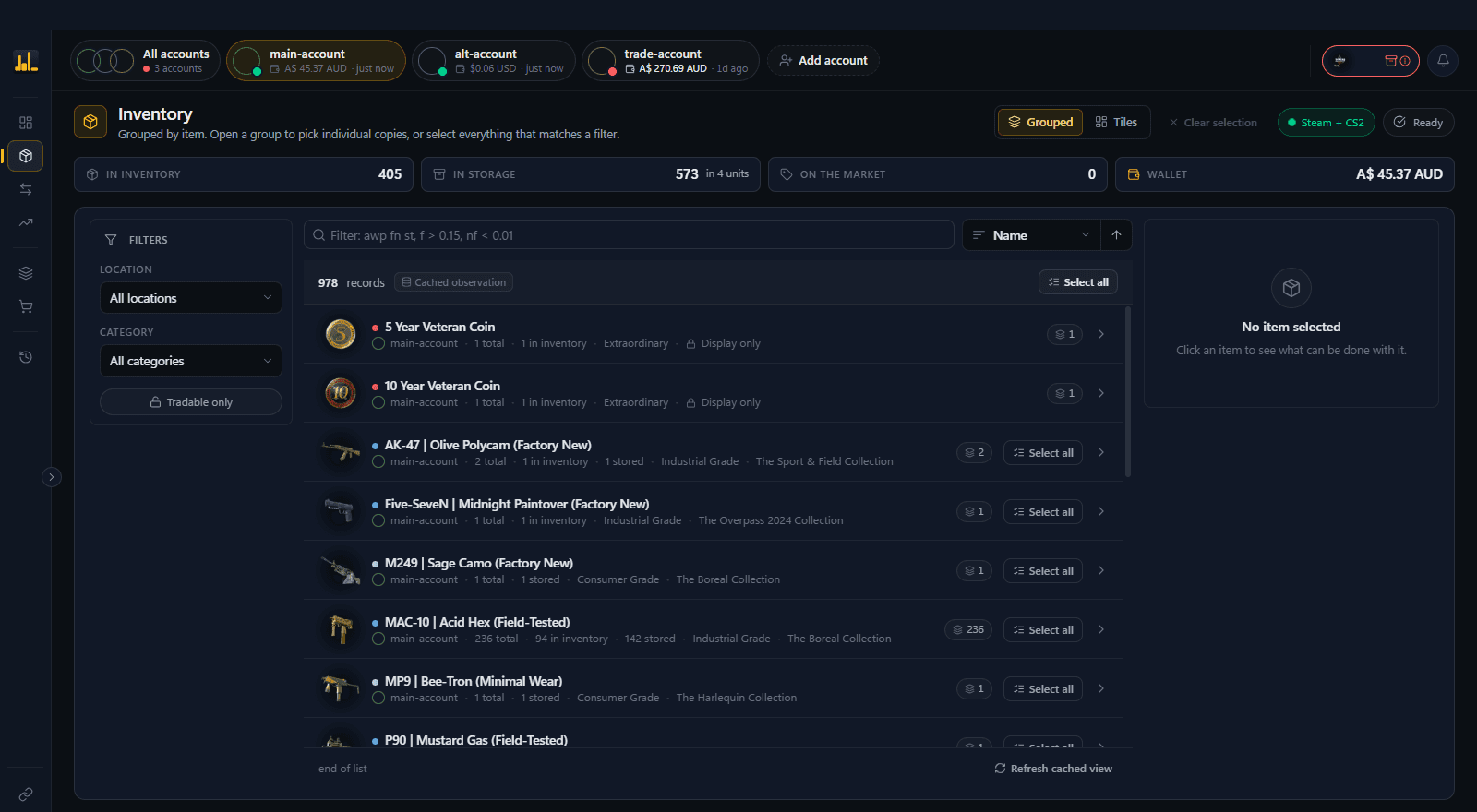
One account's inventory, grouped by item. Each row shows the count in inventory and the count in storage. Narrow the list with the filter bar
Type a name and pick it from the suggestions. Addinvfor items in your inventory,fnormwfor a wear,stfor StatTrak, or a float range such asf < 0.07. Each filter becomes a chip and the list shrinks to what matches.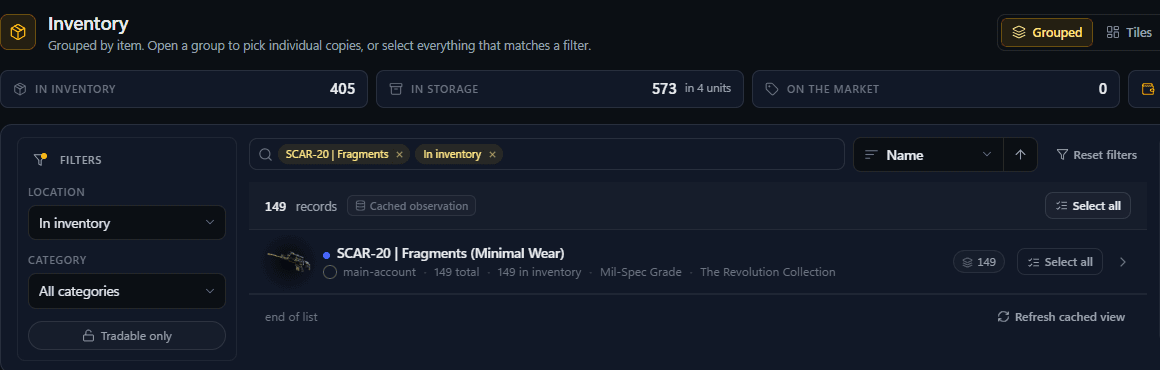
Two chips, the skin name and In inventory, leave 149 copies in the list. Select the items
Open a group and tick the copies you want, or press Select all to take everything the filter left. The panel on the right shows what is selected and what can be done with it.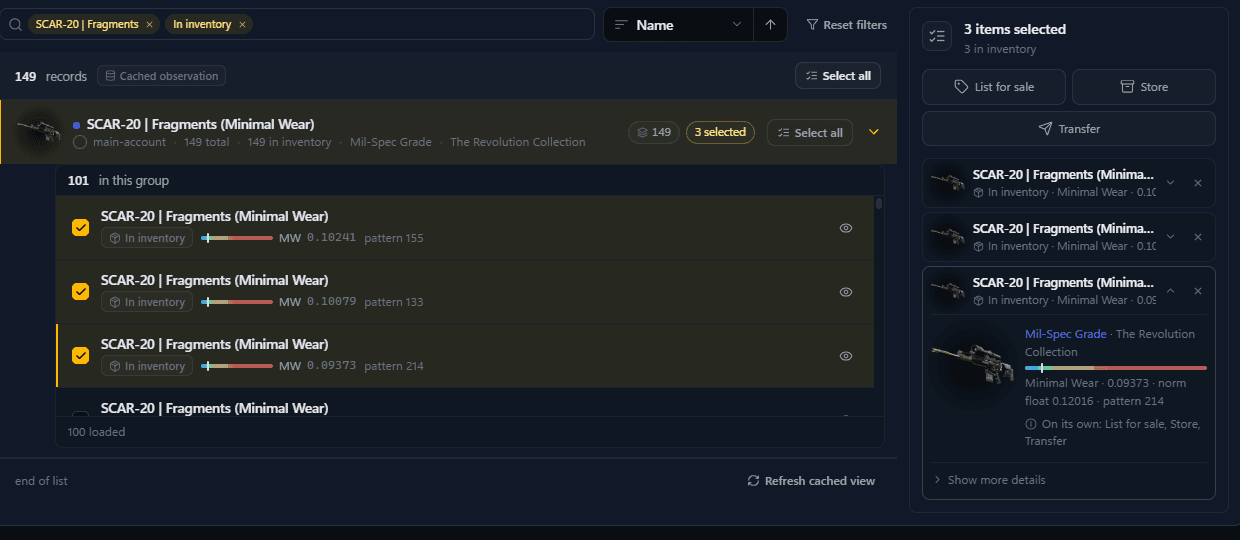
Three copies ticked. The side panel offers List for sale, Store and Transfer for the selection. Press List for sale and set one price
The listing workspace opens with one row per item. Under For every row, type either what you want to receive or what the buyer should pay, and the other figure is worked out from Steam’s fees. Any row can still be given its own price.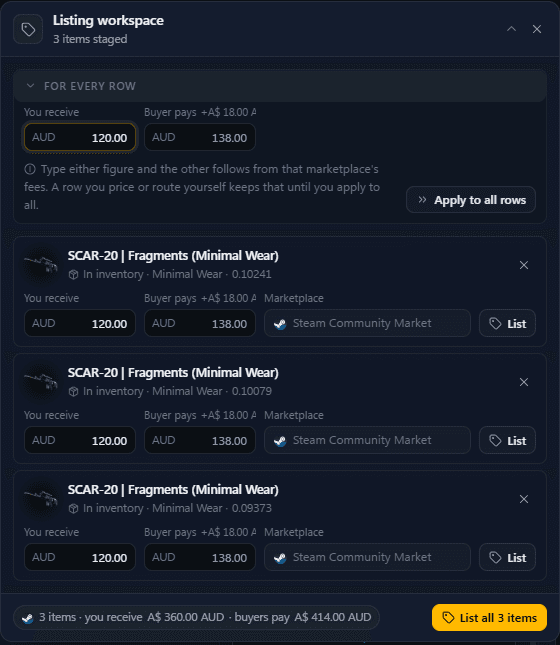
A$120.00 typed once under You receive. Every row now shows A$120.00 to you and A$138.00 to the buyer. Press List all
CSlytics submits each listing to Steam and shows the progress in the work panel. A row reads as sent, then as waiting for your phone confirmation once Steam has it. If Steam refuses one, the row says why.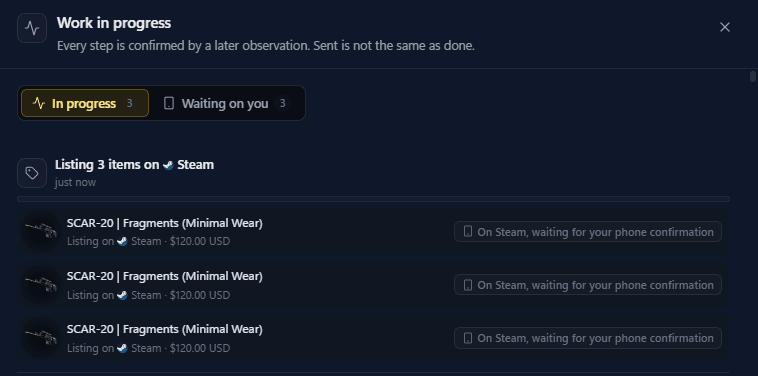
The work panel a few seconds after List all. Steam has all three and is waiting for a phone confirmation on each. Confirm on your phone
Open the Steam mobile app and confirm the listings. CSlytics never holds your Steam Guard secrets, so this step is always yours. Once confirmed, the listings show as active on the Listings page and on the Market.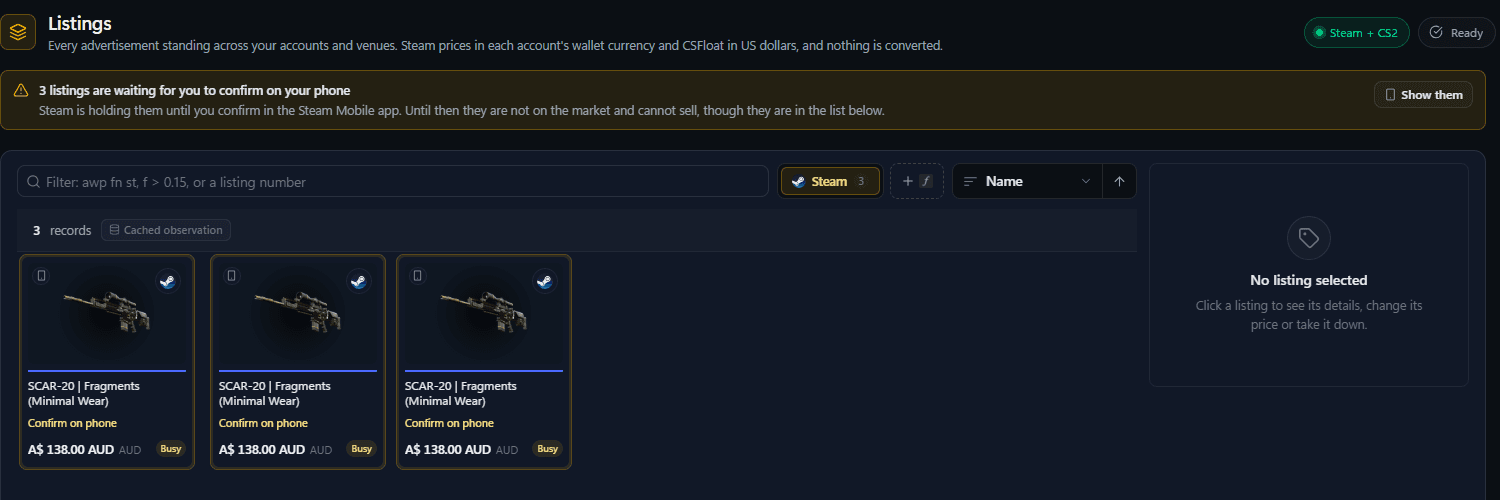
The Listings page straight after. The banner counts the listings waiting on your phone, and each card shows the buyer price of A$138.00.
Items in storage units
You do not have to take an item out of a storage unit before selling it. Select it where it is and press List for sale. The workspace marks it as retrieved from storage first, then listed, and CSlytics does the retrieve step for you before it submits the listing.
Repricing many listings at once
Steam has no way to edit a listing’s price. Changing it means taking the listing down and listing the item again, one at a time, with a new phone confirmation for each. CSlytics does the whole set in one press.
Find the listings
On the Inventory page, type the item’s name and thenlisted. Only copies that are on the Market are left. Press Select all, or tick the ones you want.Press Reprice and type the new price
Type what you want to receive. The panel shows what the buyer will pay after Steam’s fees. Press Reprice, and every selected listing gets the new price.Confirm the new listings on your phone
Each listing is taken down, then listed again at the new price, which Steam asks you to confirm. In our test, eleven listings were all waiting on the phone about a minute after the press.
To give listings different prices, open Listings and press the pencil on each one. They gather in the listing workspace, where every row can have its own price. On CSFloat a price is changed in place, with no confirmation.
What CSlytics will not do
- It will not confirm listings for you. Confirmation stays in the Steam mobile app, which is why the app never asks for your Steam Guard secrets.
- It will not list an item Steam would refuse: one under a trade or market lock, one that is not marketable, or one already on the Market.
Questions
- Does CSlytics charge a fee on sales?
- No. The only fees are Steam's, 5% plus 10% for CS2, and they are shown on every row before you list.
- Can I list from more than one account at once?
- Yes. Stay on the All accounts tab, select items across accounts, and each account's listings are submitted under that account. Each account confirms its own listings on its own phone.
- Why does every listing still need my phone?
- Steam requires a Steam Guard confirmation for each Market listing. Tools that skip this do so by holding your Steam Guard secrets, which CSlytics will not do.
- What happens if Steam refuses a listing?
- The row in the work panel shows the reason Steam gave, such as the wallet cap or a locked item, and the item stays in your inventory. Nothing is retried blindly.
- Can I change the price of listings I already have?
- Yes, in bulk. Select the listed items, press Reprice and type the new price. On Steam each listing is taken down and listed again, so each needs a new phone confirmation.
- Can I do the same on CSFloat?
- Yes. The same workspace lists on CSFloat with your own API key. Pick the marketplace per row or for every row.
Related guides
- How to check the float value of a CS2 (CS:GO) skin on the market
- How to see what a CS2 skin is worth at its exact float
- How to manage CS2 storage units in bulk
- How to move CS2 items between your own Steam accounts
- How to list CS2 items on CSFloat in bulk
- How to manage multiple Steam accounts for CS2 trading
- How to search your CS2 inventory by float, wear, pattern and storage unit