Steam moves items between accounts with a trade offer. By hand that means opening a trade window, adding items one by one, sending, confirming on your phone, then logging into the other account to accept. CSlytics does it from one window: select items on any of your accounts, pick where they go, confirm on your phone, and it accepts the offer on the receiving account for you.
What Steam requires
A trade offer needs the other account’s trade link, the items added one at a time, and a confirmation in the Steam mobile app of the account that sends. The receiving account then has to accept it. With two accounts that is two logins in two browsers or a lot of switching.
Locks and holds that apply
| Rule | What it means |
|---|---|
| Recent purchases and trades | An item bought on the Steam Market or received in a trade cannot be traded again for about seven days. |
| The reversal period | Every accepted CS2 trade can be reversed by Steam for seven days. During that time the received items cannot be traded, sold or stored. |
| Trade holds | Steam can hold a trade for up to 15 days on an account without the mobile authenticator. CSlytics checks both accounts first and will not send into a hold. |
| Items that never trade | Service medals, veteran coins and some pins can never be traded. |
Moving items with CSlytics
Select items on the All accounts tab
Stay on All accounts so you can pick from every account at once. Use the search bar to find them. A locked item shows its lock, and the Transfer panel names anything it cannot send.Press Transfer and choose the destination
The list only offers your other accounts. CSlytics then checks both accounts with Steam and tells you what it will send: how many items, in how many offers. It sends one offer per source account.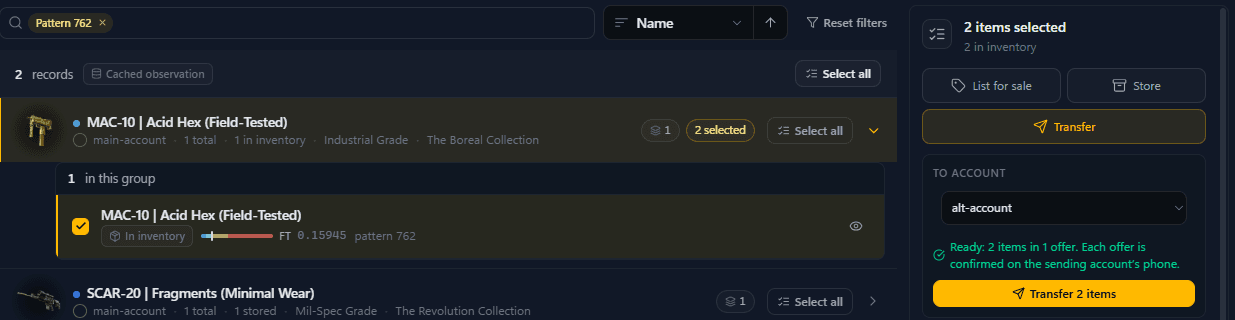
Two items checked and ready: one offer from the main account to the alt. Press Transfer and confirm on your phone
Confirm the offer in the Steam mobile app of the sending account. Nothing leaves the account until you do. CSlytics then accepts it on the receiving account, which gives nothing in return.Follow it on the Trades page
Every transfer is listed with its items and where it stands: waiting for your phone, in the reversal period, or finalized.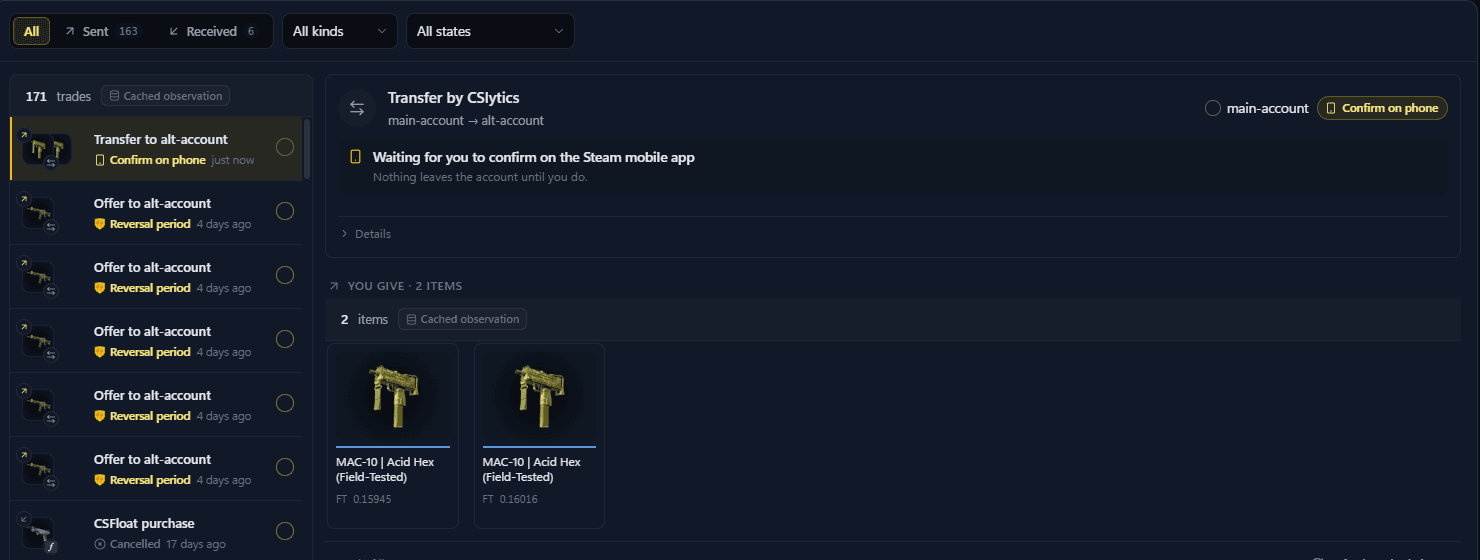
The transfer just sent, waiting for the phone confirmation. Earlier transfers below are in their reversal period.
Stored and listed items
- Stored items can be selected directly. CSlytics takes each one out of its unit first, then sends it.
- Listed items have to come off the Market or CSFloat first. Cancel the listing, then transfer.
Questions
- Can I send items to a friend with this?
- No. Transfers only go between Steam accounts you have added to CSlytics.
- Does it cost anything?
- No. Steam trades are free, and CSlytics adds no fee.
- What if I decline the confirmation on my phone?
- The offer is cancelled and the items stay where they were. The Trades page shows it as cancelled on phone.
- Why can I not send something I bought yesterday?
- Steam locks new purchases and received items for about seven days. The Transfer panel names the lock and when it ends.
Related guides
- How to check the float value of a CS2 (CS:GO) skin on the market
- How to see what a CS2 skin is worth at its exact float
- How to sell multiple items at once on the Steam Market (CS2)
- How to manage CS2 storage units in bulk
- How to list CS2 items on CSFloat in bulk
- How to manage multiple Steam accounts for CS2 trading
- How to search your CS2 inventory by float, wear, pattern and storage unit